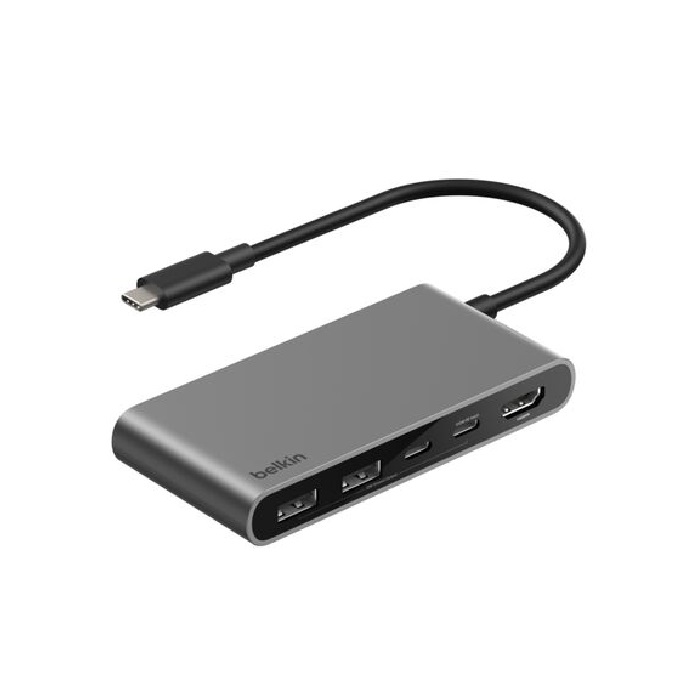
Belkin Connect 5-Port USB-C Hub With Dual USB-C Ports - (AVC022fqSGY), 100W PD, 5Gbps, 1x 4K HDMI, 2x USB-A, 2x USB-C, 2 Years Warranty
SKU: AVC022fqSGY
Notebook Accessories Docking Stations & Port Replicators
$59.95
AUD inc. GST
Out of Stock — available to order
| Brand | Belkin |
| Warranty | 24 |
| Weight | 0.00 kg |
Product Description
Belkin Connect 5-Port USB-C Hub with Dual USB-C Ports - (AVC022fqSGY)
Hybrid working professionals on the go can instantly expand the number of USB-C and USB-A ports on their laptops to connect up to five devices and optimize workstations. Upgraded HDMI 2.0† delivers crystal clear monitor resolutions, fast data transfer speeds reach up to 5Gbps and a USB-C port delivers up to 100W PD to your host device. This portable USB-C hub goes with you when you’re at the office or at home.
At a Glance:
Connect an external display plus four additional ports through one USB-C connection
Supports monitor resolutions up to 4K@60Hz
Stay charged with up to 100W of Power Delivery to your host device while you stay connected to peripherals††
Spend more time working and less time transferring with fast data transfer speeds up to 5Gbps
Get peace of mind with a 6-point safety system featuring protections from over-voltage, overload, over-current, over-temperature and short circuit, and constructed of fire-resistant materials
Made with recycled plastic*
Includes a 2-year warranty
What’s in the Box
Connect 5-Port USB-C Hub with Dual USB-C Ports
Compatibility:
•Compatible with USB-C enabled devices such as laptops, tablets, smartphones and Thunderbolt™5, Thunderbolt™4, Thunderbolt™3 ports. Supports Windows, Mac and Chrome OS.
Technical Specifications:
Integrated/Included Cable Length
7.9in/20cm tethered USB-C cable
•Dimensions (LxWxH)
4.1in/10.4cm x 2in/5cm x 0.6in/1.5cm
Warranty and Support
2-year warranty
Ports:
•2x USB-A ports
•USB-C port
•USB-C Power Delivery (PD) 3.0
•HDMI 2.0 port
Common Questions
Belkin Support Article